源代码:https://github.com/angelol/eos_account_creator
demo: https://eos-account-creator.com/
您正在查看: 2018年7月
EOS bp nodes security checklist(EOS超级节点安全执行指南)
EOS bp nodes security checklist(EOS超级节点安全执行指南)
by 慢雾安全团队 & Joinsec Team
感谢 IMEOS.ONE, EOS Asia, EOS Store 倾力相助
English
超级节点安全审计方案
目录
架构核心目标
- 保护出块服务器正常通信与运行
- 增强初始主网整体抗攻击能力
- 保护节点安全
面临的主要问题
- 对初始状态主网进行 DDoS
- RPC 功能滥用
- 通信故障
架构核心设计
- BP 服务器隔离
- 多跳转节点(小节点流量转发,大节点高防护)
- 多链路高可用
核心防御
- 默认关闭 RPC。必须打开时,混淆端口,并架设高防等保护
- BP 通信多链路设计
- BP 服务器不在公网上暴露,通过跳板服务器(跳板服务器数量要大)进行通信;
- 在外网公布的跳板服务器大面积瘫痪时,通过私有网络(1.私有秘密节点 2.私有 VPN 链路)来同步区块
- 防止全网扫描定位高防后的服务器,修改同步端口 9876(同理 RPC 的 8888)至全网最大存活数量的端口 80、443 或 22,这样可以有效抬高攻击者定位成本。
推荐总架构
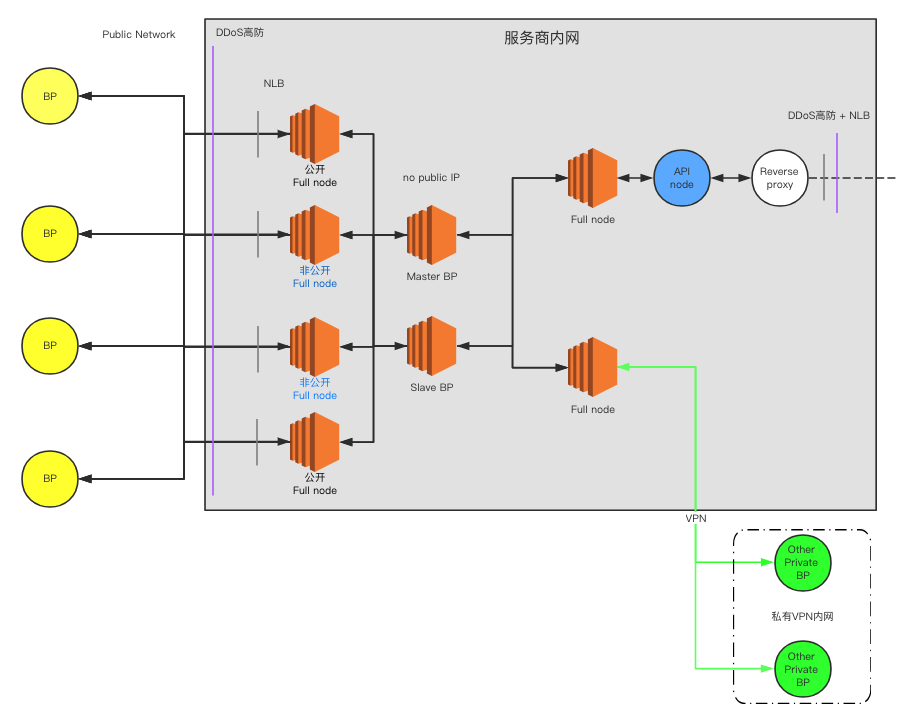
架构说明:
为了应对可能的 DDoS 攻击,节点应准备多条链路,在攻击到来后,可以随时通过备用链路进行通信,确保主网顺利启动,并持续出块。
首先,每个节点应至少准备 2 个公开 full node、2 个私密 full node,公开 full node 的 IP 可以对外公开,以供 Dapp 和主网正常通信。另 2 个私密 full node 的 IP 只告知被选中的其他超级节点,不对外公开,以避免同时遭遇 DDoS 攻击。
假如私密 full node 的 IP 也被攻击者获知(例如扫描全网所有 IPv4 地址)并遭遇 DDoS 攻击导致节点间无法正常通信,此时可通过 VPN 加密链路连接到虚拟内网,确保 21 个超级节点之间不间断的正常通信。
架构各部分设计说明
1. 公开节点(对外公开在社区节点列表里)
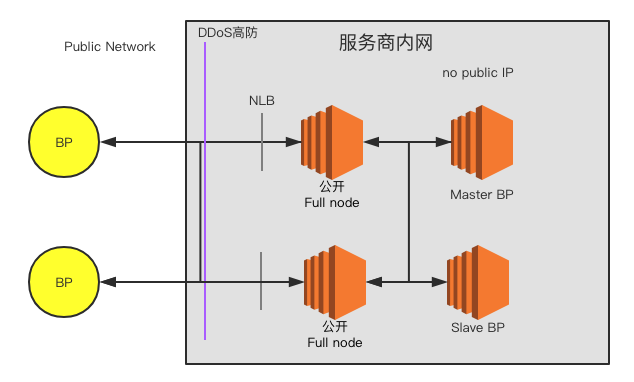
在没有攻击情况下,外围节点通过对外公布的公开节点进行通信。
2. 私密节点(只对其他可信BP节点私密分享的通信节点)
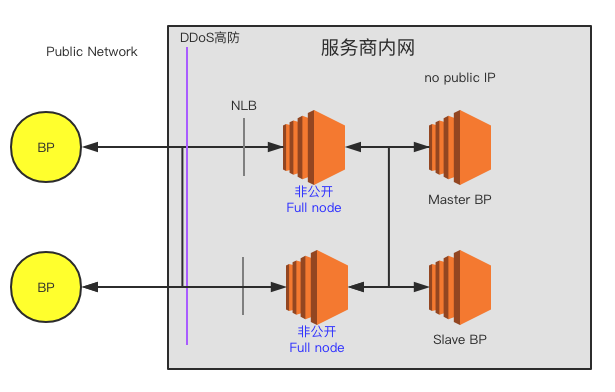
当攻击者通过公开的节点列表攻击公开节点造成公开节点不可用时,则可通过私密节点进行通信。(私密节点可被全网扫描发现,所以并不是完全安全)
3. VPN 加密节点(各可信节点间最后的秘密的通信信道)
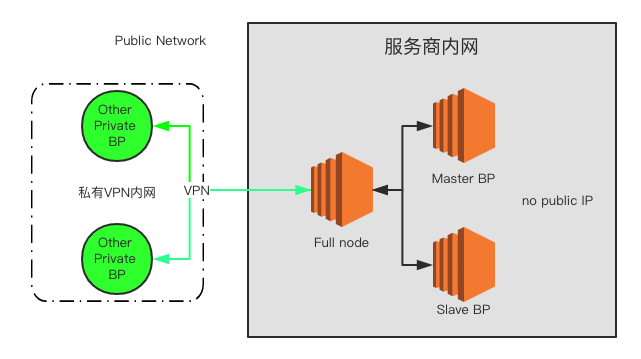
当公网节点都被发现,并且攻击者进行攻击导致对公网 full node 服务器全部阻塞,最后则由私有 VPN 网络在隔离的虚拟内网内进行通信,保证最基础的出块正常。
4. RPC API 节点
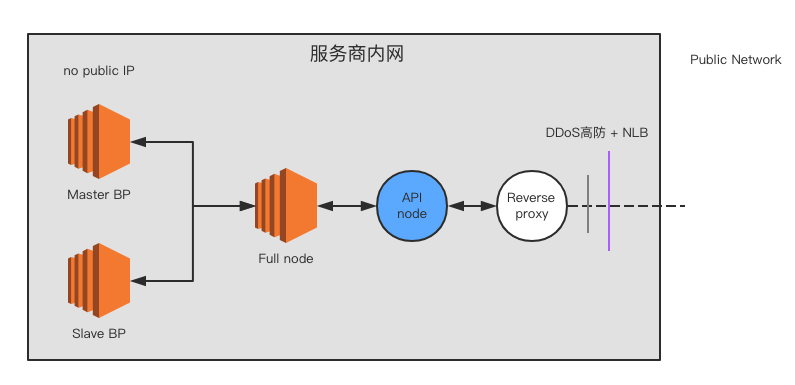
查询用 RPC 所在 full node 与 BP 完全隔离并架设防御,保证外网对 RPC 的攻击不能影响到 BP。
安全加固方案
1. RPC 安全
1.1 屏蔽 RPC
如无必要,建议禁止 RPC 对外访问,config.ini配置内容如下:
- 配置为空值
http-server-address = - 注释
https-server-address
1.2 开启 SSL
如果确实需要对外提供 RPC 服务,建议禁用 HTTP 协议,使用 HTTPS,config.ini配置内容如下:
- 注释
http-server-address,或者配置为127.0.0.1:8888 - 配置
https-server-address为0.0.0.0:443 - 配置
https-certificate-chain-file和https-private-key-file为证书链文件路径和私钥文件路径,注意两个文件格式必须为 PEM - 配置证书链文件和私钥文件权限为 600
1.3 禁用 wallet_plugin 和 wallet_api_plugin
在对外提供 RPC 服务的场景下,一定不要加载 wallet_plugin 和 wallet_api_plugin。如果加载了wallet_plugin 和 wallet_api_plugin,攻击者就可以通过 RPC API /v1/wallet/list_keys 获取已解锁账户的私钥。此外,攻击者还可以恶意循环调用/v1/wallet/lock_all使节点上的账户无法解锁。
1.4 禁用producer_api_plugin
在对外提供 RPC 服务的场景下,一定不要加载 producer_api_plugin。如果加载了producer_api_plugin,攻击者就可以通过 RPC API /v1/producer/pause 远程控制节点停止生产。
2. 配置安全
2.1 生成 Active 多签密钥
由于超级节点账户的公私钥明文配置在config.ini中,存在较大的风险,建议对这个账户生成 Active 多签,提高资产转出门槛。举例如下:
授予 shrimp2 和 shrimp3 拥有 shrimp1 的权限

cleos set account permission shrimp1 active '{"threshold":2,"keys":[{"key":"EOS6tjMy84SYqQEUcUXQeMLmeBo99aakJCbieu2TSMk2Agn6nTwmX","weight":2}],"accounts":[{"permission":{"actor":"shrimp2","permission":"active"},"weight":1},{"permission":{"actor":"shrimp3","permission":"active"},"weight":1}],"waits":[]}' owner
2.2 开启日志记录
在配置文件中配置logconf参数,记录必要的 RPC 请求日志。
2.3 Docker 默认参数优化
官方仓库https://github.com/EOSIO/eos/blob/master/Docker/config.ini中的配置过于宽泛,加载了(官方已优化),建议在wallet_api_plugin等插件,存在较大风险docker build之前修改配置。
2.4 max-clients参数优化
在配置文件中配置max-clients = 0 提升 P2P 端口并发连接数为无限制,同时优化ulimit系统参数和内核参数,增强恶意连接攻击承受能力。
官方在 这个提交中修复了P2P单节点恶意连接的问题,并新增了默认配置max_nodes_per_host = 1。所以max-clients不需要设置为0,可以根据节点性能酌情配置。
2.5 非 root 启动 nodeos
建议编译完成后,创建普通用户账号,并使用该账号启动 nodeos,避免使用 root,降低风险。
2.6 监听随机端口
p2p-listen-endpoint = ip:http-server-address = ip:
每次启动会随机监听一个端口,如果是对外服务的,建议采用 主机安全 中的配置方法
3. 网络安全
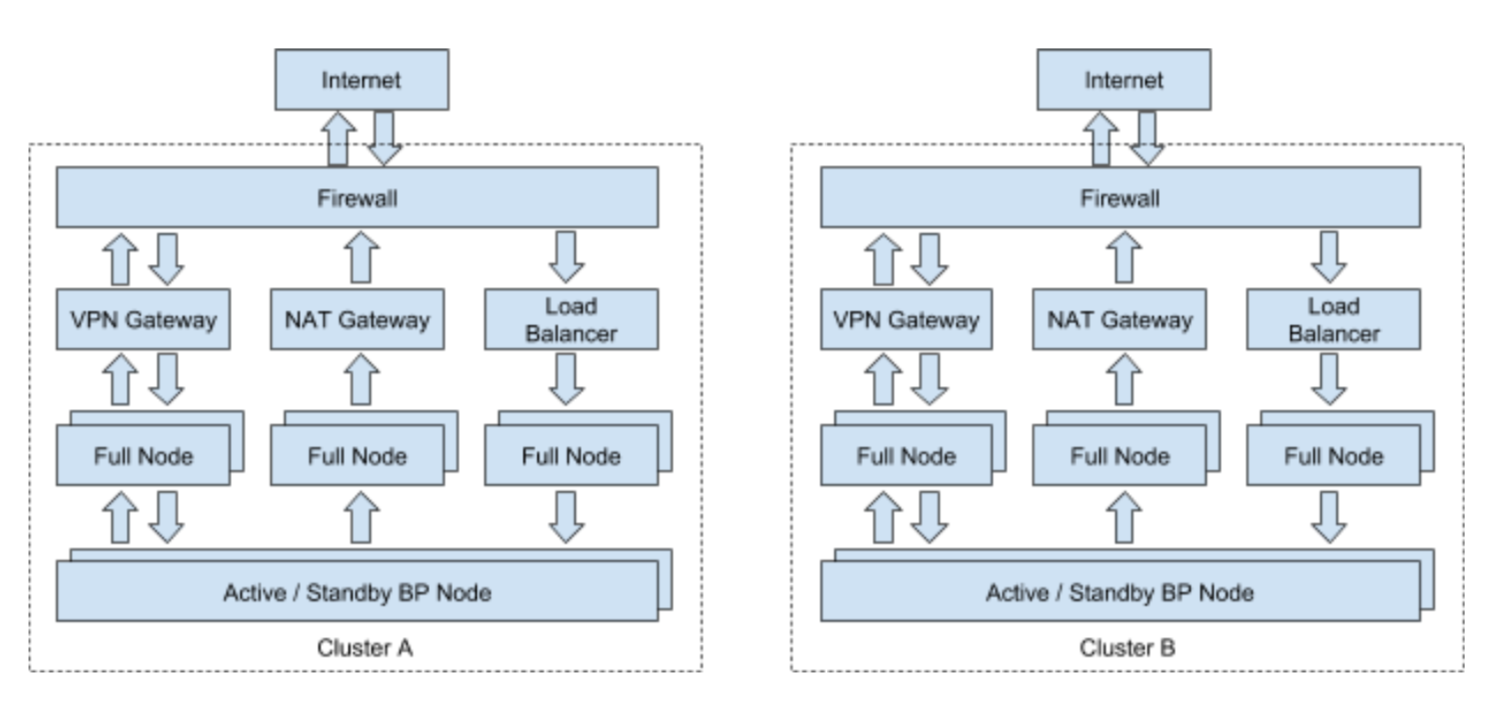
3.1 网络架构
为应对可能的 DDoS 攻击导致节点主网络阻塞的问题,建议提前配置备份网络,例如私密 VPN 网络。具体可参考 EOS Asia 的架构图:
3.2 云服务商
经慢雾安全团队测试,Google Cloud、AWS 及 UCloud 等具有更好的抗 DDoS 攻击的性能,并且在 DDoS 攻击过后服务商不会临时封锁服务器,可以极为快速的恢复网络访问,推荐超级节点使用。(请谨慎选择云服务商,许多云服务商在遭遇 DDoS 等攻击时会直接关闭服务器)
3.3 DDoS 防御
为应对可能发生的 DDoS 攻击,建议超级节点提前配置 Cloudflare、AWS Shield 等 DDoS 高防服务。
4. 主机安全
- 防止全网扫描定位高防后的服务器,修改同步端口 9876 (同理 RPC 的 8888)至全网最大存活数量的端口 80、443 或 22,这样可以有效抬高攻击者定位成本。
- 关闭不相关的其他服务端口,并在 AWS 或 Google Cloud 上定制严格的安全规则。
- 更改 SSH 默认的 22 端口,配置 SSH 只允许用 key (并对 key 加密)登录,禁止密码登录,并限制访问 SSH 端口的 IP 只能为我方运维 IP。
- 在预算充足的情况下,推荐部署优秀的 HIDS(或者强烈建议参考开源的 OSSEC 相关做法),及时应对服务器被入侵。
5. 威胁情报
- 强烈建议做好相关重要日志的采集、储存与分析工作,这些日志包括:RPC 与 P2P 端口的完整通信日志、主机的系统日志、节点相关程序的运行日志等。储存与分析工作可以选择自建类似 ELK(ElasticSearch, Logstash, Kibana) 这样的开源方案,也可以购买优秀的商业平台。
- 如果使用了成熟的云服务商,他们的控制台有不少威胁情报相关模块可重点参考,以及时发现异常。
- 当节点出现重大漏洞或相关攻击情报,第一时间启动应急预案,包括灾备策略与升级策略。
- 社区情报互通有无。
致谢
在此非常感谢
- HelloEOS
- EOS Asia
- EOSBIXIN
- EOS Pacific
- UnlimitedEOS
- EOS Cannon
- EOSpace
- Blockgenic
- EOSeco
- EOSLaoMao
- OneChain
等社区节点参与到节点安全测试中,为社区安全积累了宝贵的数据。
转载自 https://github.com/slowmist/eos-bp-nodes-security-checklist
获取RAM实时价格
命令如下
cleos -u https://nodes.get-scatter.com:443 get table eosio eosio rammarket获取的结果为
{
  "rows": [{
      "supply": "10000000000.0000 RAMCORE",
      "base": {
        "balance": "12341975994 RAM",
        "weight": "0.50000000000000000"
      },
      "quote": {
        "balance": "5568015.6361 EOS",
        "weight": "0.50000000000000000"
      }
    }
  ],
  "more": false
}
然后使用Bancor算法,计算出需要nKB的RAM的价格
RAM价格 = (n * quote.balance) / (n + base.balance / 1024)RPC代码实现如下
const wif = '5JC9FdRjX3c3fsB62S5Tz22LgTuRHegb1XEV16uft8u3njmm9E5'
eos = Eos({
    httpEndpoint: 'https://nodes.get-scatter.com:443',
    chainId: 'aca376f206b8fc25a6ed44dbdc66547c36c6c33e3a119ffbeaef943642f0e906',
    keyProvider: wif,
    verbose: true
    })
eos.getTableRows(true,"eosio", "eosio", "rammarket").then(result => {
    console.log(1 * result.rows[0].quote.balance.split(" ")[0] / (1 + result.rows[0].base.balance.split(" ")[0] / 1024));
}).catch(e => {
    console.error(e);
})
当前返回价格:0.4716754832469308 EOS/Kib
参考:github
EOS发起交易时,提示ram,net或cpu资源不足问题分析与解决(Error 3080001: account using more than allotted RAM usage)
一般创建账号,或者三方购买的账号都是最低的资源创建的 (cleos system newaccount 消耗最少的EOS资源)
基本账号下CPU和NET都是零,RAM 3kb以下,因为RAM收费逻辑(EOS零手续费免费?你不知道的EOS收费细节)
- 只要action中执行了持久化存储相关的逻辑就需要收取ram使用费,比如系统合约的newaccount ,updateauth, setcode, setabi, schedule_deferred_transaction, eosio.token的transfer
所以在账号资源不足的情况下,转账操作会提示以下错误
surou@surou-C-H110M-K-Pro:~/.local/share/eosio/nodeos/config$ cleos push action eosio.token transfer '["eosio", "bcskillsurou","100.0000 EOS","vote"]' -p eosio
executed transaction: e233ccc335b833ac9d7746a43e3b4e591795151c95f989a36976f8ceb98a08c7  136 bytes  562 us
#   eosio.token <= eosio.token::transfer        {"from":"eosio","to":"bcskillsurou","quantity":"100.0000 EOS","memo":"vote"}
#         eosio <= eosio.token::transfer        {"from":"eosio","to":"bcskillsurou","quantity":"100.0000 EOS","memo":"vote"}
#  bcskillsurou <= eosio.token::transfer        {"from":"eosio","to":"bcskillsurou","quantity":"100.0000 EOS","memo":"vote"}
warning: transaction executed locally, but may not be confirmed by the network yet
surou@surou-C-H110M-K-Pro:~/.local/share/eosio/nodeos/config$ cleos get currency balance eosio.token bcskillsurou
100.0000 EOSsurou@surou-C-H110M-K-Pro:~/.local/share/eosio/nodeos/config$ cleos push action eosio.token transfer '["bcskillsurou", "eosio","1.0000 EOS","vote"]' -p bcskillsurou
Error 3080001: account using more than allotted RAM usage提示RAM不足已支持转账
如果自己给自己直接购买RAM的话
surou@surou-C-H110M-K-Pro:~/.local/share/eosio/nodeos/config$ cleos system buyram bcskillsurou bcskillsurou "0.1000 EOS"
3536793ms thread-0   main.cpp:429                  create_action        ] result: {"binargs":"a0e9d5384607313aa0e9d5384607313ae80300000000000004454f5300000000"} arg: {"code":"eosio","action":"buyram","args":{"payer":"bcskillsurou","receiver":"bcskillsurou","quant":"0.1000 EOS"}}
Error 3080002: transaction exceeded the current network usage limit imposed on the transaction
提示NET不足
如果自己给自己抵押换取NET和CPU时
surou@surou-C-H110M-K-Pro:~/.local/share/eosio/nodeos/config$ cleos system delegatebw bcskillsurou bcskillsurou '0.1000 EOS' '0.1000 EOS' -p bcskillsurou
48402ms thread-0   main.cpp:1084                 operator()           ] act_payload: {"from":"bcskillsurou","receiver":"bcskillsurou","stake_net_quantity":"0.1000 EOS","stake_cpu_quantity":"0.1000 EOS","transfer":false}
48403ms thread-0   main.cpp:429                  create_action        ] result: {"binargs":"a0e9d5384607313aa0e9d5384607313ae80300000000000004454f5300000000e80300000000000004454f530000000000"} arg: {"code":"eosio","action":"delegatebw","args":{"from":"bcskillsurou","receiver":"bcskillsurou","stake_net_quantity":"0.1000 EOS","stake_cpu_quantity":"0.1000 EOS","transfer":false}}
Error 3080001: account using more than allotted RAM usage又提示RAM不足...先有鸡还是先有蛋,死循环。所以只能让其他RAM资源充足的账号例如 eosio 帮此账号bcskillsurou购买
surou@surou-C-H110M-K-Pro:~/.local/share/eosio/nodeos/config$ cleos system buyram eosio bcskillsurou "0.1000 EOS"
177473ms thread-0   main.cpp:429                  create_action        ] result: {"binargs":"0000000000ea3055a0e9d5384607313ae80300000000000004454f5300000000"} arg: {"code":"eosio","action":"buyram","args":{"payer":"eosio","receiver":"bcskillsurou","quant":"0.1000 EOS"}}
executed transaction: f5aa4dd7f6a850b65884174a4f86285414ca5c50ba1ab6ddc2a7f9ba5b65c051  128 bytes  1814 us
#         eosio <= eosio::buyram                {"payer":"eosio","receiver":"bcskillsurou","quant":"0.1000 EOS"}
#   eosio.token <= eosio.token::transfer        {"from":"eosio","to":"eosio.ram","quantity":"0.0995 EOS","memo":"buy ram"}
#         eosio <= eosio.token::transfer        {"from":"eosio","to":"eosio.ram","quantity":"0.0995 EOS","memo":"buy ram"}
#     eosio.ram <= eosio.token::transfer        {"from":"eosio","to":"eosio.ram","quantity":"0.0995 EOS","memo":"buy ram"}
#   eosio.token <= eosio.token::transfer        {"from":"eosio","to":"eosio.ramfee","quantity":"0.0005 EOS","memo":"ram fee"}
#         eosio <= eosio.token::transfer        {"from":"eosio","to":"eosio.ramfee","quantity":"0.0005 EOS","memo":"ram fee"}
#  eosio.ramfee <= eosio.token::transfer        {"from":"eosio","to":"eosio.ramfee","quantity":"0.0005 EOS","memo":"ram fee"}
warning: transaction executed locally, but may not be confirmed by the network yet当bcskillsurouRAM足够后,就可以自己或者其他账号抵押购买CPU和NET了
surou@surou-C-H110M-K-Pro:~/.local/share/eosio/nodeos/config$ cleos system delegatebw bcskillsurou bcskillsurou '0.1000 EOS' '0.1000 EOS' -p bcskillsurou
214840ms thread-0   main.cpp:1084                 operator()           ] act_payload: {"from":"bcskillsurou","receiver":"bcskillsurou","stake_net_quantity":"0.1000 EOS","stake_cpu_quantity":"0.1000 EOS","transfer":false}
214841ms thread-0   main.cpp:429                  create_action        ] result: {"binargs":"a0e9d5384607313aa0e9d5384607313ae80300000000000004454f5300000000e80300000000000004454f530000000000"} arg: {"code":"eosio","action":"delegatebw","args":{"from":"bcskillsurou","receiver":"bcskillsurou","stake_net_quantity":"0.1000 EOS","stake_cpu_quantity":"0.1000 EOS","transfer":false}}
executed transaction: b57bad80a397c6fee9aab0519600b9c063f6084fadd542402fe07ce93d2643bb  144 bytes  1720 us
#         eosio <= eosio::delegatebw            {"from":"bcskillsurou","receiver":"bcskillsurou","stake_net_quantity":"0.1000 EOS","stake_cpu_quanti...
#   eosio.token <= eosio.token::transfer        {"from":"bcskillsurou","to":"eosio.stake","quantity":"0.2000 EOS","memo":"stake bandwidth"}
#  bcskillsurou <= eosio.token::transfer        {"from":"bcskillsurou","to":"eosio.stake","quantity":"0.2000 EOS","memo":"stake bandwidth"}
#   eosio.stake <= eosio.token::transfer        {"from":"bcskillsurou","to":"eosio.stake","quantity":"0.2000 EOS","memo":"stake bandwidth"}
warning: transaction executed locally, but may not be confirmed by the network yet
此时再次转账的话
surou@surou-C-H110M-K-Pro:~/.local/share/eosio/nodeos/config$ cleos get currency balance eosio.token bcskillsurou
99.8000 EOS
surou@surou-C-H110M-K-Pro:~/.local/share/eosio/nodeos/config$ cleos push action eosio.token transfer '["bcskillsurou", "eosio","1.0000 EOS","vote"]' -p bcskillsurou
executed transaction: cd9a0780b51db71a0efd096578dc453d26a528af6fa4e4e7ab0b139e9d9753ae 136 bytes 548 us
# eosio.token <= eosio.token::transfer {"from":"bcskillsurou","to":"eosio","quantity":"1.0000 EOS","memo":"vote"}
# bcskillsurou <= eosio.token::transfer {"from":"bcskillsurou","to":"eosio","quantity":"1.0000 EOS","memo":"vote"}
# eosio <= eosio.token::transfer {"from":"bcskillsurou","to":"eosio","quantity":"1.0000 EOS","memo":"vote"}
warning: transaction executed locally, but may not be confirmed by the network yetsurou@surou-C-H110M-K-Pro:~/.local/share/eosio/nodeos/config$ cleos get currency balance eosio.token bcskillsurou
98.8000 EOS就一切OK了
最新回复
fzd: 请问这个解决了吗
StarkWare explained: layer 2 solution provider of dYdX and iMMUTABLE R11; BitKeep News: [...]Layer 2: https://...
一文读懂 StarkWare:dYdX 和 Immutable 背后的 L2 方案 R11; BitKeep 博客: [...]Layer 2:Comparing Laye...
http://andere.strikingly.com/: Regards, Great stuff!
surou: 需要先执行提案合约申请,等待出块节点地址同意后,才会进...
heco: WARN [11-19|11:26:09.459] N...
P: 你好,我在heco链上遇到了“tx fee excee...
Peng: 楼主安装成功了吗?我正在同步区块链,一天了,差不多才同...
joyhu: 你好,请问下安装好之后如何获取到bee.yaml配置文...
kaka: 支票最终怎么提币呢?
归档
March 2026February 2026January 2026December 2025November 2025October 2025September 2025August 2025July 2025June 2025May 2025April 2025March 2025February 2025January 2025December 2024November 2024October 2024September 2024August 2024July 2024June 2024May 2024April 2024March 2024January 2024December 2023November 2023October 2023September 2023August 2023July 2023June 2023April 2023March 2023February 2023January 2023December 2022November 2022October 2022August 2022July 2022June 2022May 2022March 2022February 2022January 2022December 2021November 2021October 2021September 2021August 2021July 2021June 2021May 2021April 2021March 2021February 2021January 2021December 2020November 2020October 2020September 2020July 2020June 2020May 2020April 2020March 2020February 2020January 2020December 2019November 2019October 2019September 2019August 2019July 2019June 2019May 2019April 2019March 2019February 2019January 2019December 2018November 2018October 2018September 2018August 2018July 2018June 2018