您正在查看: Other Chain 分类下的文章

如何让dfuse-eosio 的dashboard 可以外网访问

由于部署的服务器一般为server版,没有UI界面,所以目前dfuse-eosio默认的本地访问地址很不方便,为了外部访问,编译前,需要修改下配置,

要修改的配置在https://github.com/dfuse-io/dlauncher 项目中,当编译dfuse-eosio时,./scripts/build.sh会自动在当前目录的上层目录下,获取dlauncher源码。

当dlauncher代码获取完,再将dlauncher\dashboard\client\src\.env中的 http://localhost:8080修改成对应的地址

REACT_APP_DASHBOARD_GRPC_WEB_URL=http://localhost:8080/api

比如修改成

REACT_APP_DASHBOARD_GRPC_WEB_URL=http://39.106.103.152:8080/api

然后重新编译即可。

当然我们只是为了测试演示,生产环境中,并不会直接暴露在外网,因为此后台并没有权限验证,一般是外层再加层防护,比如VPN

dfuse-eosio 如何添加自定义查询条件,例如transfer中的memo

为了业务的需要的,我们常常需要查询交易中的一些自定义的参数,比如transfer 中的memo
当我们按找REST API文档使用时,

http://39.106.103.152:8080/v0/search/transactions?start_block=0&block_count=327722&limit=10&sort=desc&q=receiver:eosio.token+action:transfer+data.memo:return

会报不支持

"server error: unable to initiate to search: The following fields you are trying to search are not currently indexed: 'data.memo'. Contact our support team for more."

解决方案

被索引的操作的数据字段定义为search-common-indexed-terms默认配置为"receiver, account, action, auth, scheduled, status, notif, input, event, ram.consumed, ram.released, db.key, db.table, data.account, data.active, data.active_key, data.actor, data.amount, data.auth, data.authority, data.bid, data.bidder, data.canceler, data.creator, data.executer, data.from, data.is_active, data.is_priv, data.isproxy, data.issuer, data.level, data.location, data.maximum_supply, data.name, data.newname, data.owner, data.parent, data.payer, data.permission, data.producer, data.producer_key, data.proposal_name, data.proposal_hash, data.proposer, data.proxy, data.public_key, data.producers, data.quant, data.quantity, data.ram_payer, data.receiver, data.requested, data.requirement, data.symbol, data.threshold, data.to, data.transfer, data.voter, data.voter_name, data.weight, data.abi, data.code"

所有不以data.“.”开头的字段都是“固定的”,这意味着您可以将它们包含在列表中以对其进行索引或关闭以禁用对其的索引编制,但是我们不能添加新的字段(block_timestamp例如,将被拒绝)。

所有开始data.都是动态的字段,并且可以是任何字段,如果它们与操作的字段名称匹配,则将对其进行索引,例如,如果您部署了具有操作event_id且data.event_id列表中有的智能合约,则可以按receiver:mycontract data.event_id:something。

现在,大约data.memo可以将其添加到列表中,它将起作用,但是它将是完全匹配的,在memo数据上没有标记化,也没有解释。一个手段memo形式first second third,data.memo:first将不匹配,只有data.memo:'first second third'将匹配字段。

最终修改

编译dfuse.yaml,在flags中添加

search-common-indexed-terms: "receiver, account, action, auth, scheduled, status, notif, input, event, ram.consumed, ram.released, db.key, db.table, data.account, data.active, data.active_key, data.actor, data.amount, data.auth, data.authority, data.bid, data.bidder, data.canceler, data.creator, data.executer, data.from, data.is_active, data.is_priv, data.isproxy, data.issuer, data.level, data.location, data.maximum_supply, data.name, data.newname, data.owner, data.parent, data.payer, data.permission, data.producer, data.producer_key, data.proposal_name, data.proposal_hash, data.proposer, data.proxy, data.public_key, data.producers, data.quant, data.quantity, data.ram_payer, data.receiver, data.requested, data.requirement, data.symbol, data.threshold, data.to, data.transfer, data.voter, data.voter_name, data.weight, data.abi, data.code, data.memo"

原有数据基础上增加data.memo,重新运行dfuseeos 即可

参考

https://github.com/dfuse-io/dfuse-eosio/issues/209
dfuse-eosio 常用REST API接口整理

测试环境

目前在http://39.106.103.152:8080 搭建了一个测试服务,我们基于测试服务做接口测试

REST API

1. 查询交易

官方文档

https://docs.dfuse.io/eosio/public-apis/reference/rest/get-search-transactions/

测试查询
http://39.106.103.152:8080/v0/search/transactions?start_block=0&block_count=100000&limit=10&sort=desc&q=receiver:eosio.token+action:transfer+data.to:xihzz2blorkc

这个查询交易相当的灵活,不但能根据区块区间,还能根据查询action相应参数做查询

2. 根据时间查询区块

官方文档

https://docs.dfuse.io/eosio/public-apis/reference/rest/get-block_id-by_time/

测试查询
http://39.106.103.152:8080/v0/block_id/by_time?time=2021-01-27T10:36:14.5Z&comparator=gte

comparator参数

  • gt 大于
  • gte 大于等于
  • lt 小于
  • lte 小于等于
  • eq 相等

3. 任意块高度获取给定合同帐户的ABI

官方文档

https://docs.dfuse.io/eosio/public-apis/reference/rest/get-state-abi/

测试查询
http://39.106.103.152:8080/v0/state/abi?account=eosio&block_num=10000&json=true

4. 任意块高度获取由给定公钥控制的帐户

官方文档

https://docs.dfuse.io/eosio/public-apis/reference/rest/get-state-key_accounts/

测试查询
http://39.106.103.152:8080/v0/state/key_accounts?public_key=EOS8G6gjXRpMHdaQhZr2DU1myKKf7RgsT5MXaggBYxtqfaTnNgazf

5. 在任何块高度上,获取区块链上任何帐户的链接授权的快照

官方文档

https://docs.dfuse.io/eosio/public-apis/reference/rest/get-state-permission_links/

测试查询

我们先在测试网上设置好测试数据

cleos -u http://47.94.225.179:2222 set account permission xihzz2blorkc claimer '{"threshold":1, "keys":[], "accounts":[{"permission":{"actor":"bcskillsurou","permission":"active"},"weight":1}],"waits":[]}' active -p xihzz2blorkc
cleos -u http://47.94.225.179:2222 set action permission xihzz2blorkc eosio claimrewards claimer

测试查询

http://39.106.103.152:8080/v0/state/permission_links?account=xihzz2blorkc&block_num=327722

6. 在任何块高度获取任何表的状态

官方文档

https://docs.dfuse.io/eosio/public-apis/reference/rest/get-state-table/

测试查询
http://39.106.103.152:8080/v0/state/table?account=eosio.token&scope=xihzz2blorkc&table=accounts&block_num=327722&json=true

7. 从任何表的状态以任何块高度获取单行

官方文档

https://docs.dfuse.io/eosio/public-apis/reference/rest/get-state-table-row/

测试查询
http://39.106.103.152:8080/v0/state/table/row?account=eosio.token&scope=xihzz2blorkc&table=accounts&primary_key=RES&key_type=symbol_code&block_num=327722&json=true

8. 以任意块高度获取合同帐户上给定表的合并范围列表

官方文档

https://docs.dfuse.io/eosio/public-apis/reference/rest/get-state-table_scopes/

测试用例
http://39.106.103.152:8080/v0/state/table_scopes?account=eosio.token&table=accounts

9. 从任何块高度的合同帐户组中获取一张表

比较常见的用途就是,从多个代币合约中查询某个账户各个代币余额

官方文档

https://docs.dfuse.io/eosio/public-apis/reference/rest/get-state-tables-accounts/

测试查询

测试前先再发一个代币

cleos -u http://47.94.225.179:2222 set contract xihzz2blorkc contracts/eosio.token 
cleos -u http://47.94.225.179:2222 push action xihzz2blorkc create '{"issuer":"xihzz2blorkc", "maximum_supply": "10000000000.00000000 BCS"}' -p xihzz2blorkc 
cleos -u http://47.94.225.179:2222 push action xihzz2blorkc issue '{"to":"xihzz2blorkc","quantity":"1000000000.00000000 BCS","memo":"issue"}' -p xihzz2blorkc 
cleos -u http://47.94.225.179:2222 transfer xihzz2blorkc bcskillsurou "0.00000001 BCS" "transfer" -p xihzz2blorkc -c xihzz2blorkc

测试查询
查询bcskillsurou在eosio.token和xihzz2blorkc两个代币合约中的代币余额

http://39.106.103.152:8080/v0/state/tables/accounts?accounts=eosio.token|xihzz2blorkc&scope=bcskillsurou&table=accounts&block_num=336806&json=true

10. 在任意块高度处,为一组范围的给定协定获取表中的所有行

比较常见的用途就是,从单个代币合约中查询多个账户余额

官方文档

https://docs.dfuse.io/eosio/public-apis/reference/rest/get-state-tables-scopes/

测试查询
http://39.106.103.152:8080/v0/state/tables/scopes?account=eosio.token&scopes=xihzz2blorkc|bcskillsurou&table=accounts&block_num=327722&json=true

11. 获取与提供的参数关联的事务生命周期:id

官方文档

https://docs.dfuse.io/eosio/public-apis/reference/rest/get-transactions/

测试查询
http://39.106.103.152:8080/v0/transactions/53e4f9b831b347a33c43807777552029fc73d176905d757d93be97acb7b2e24e

12. 在任何块高度,根据给定合约帐户的ABI解码给定表的二进制行(以十六进制字符串)

官方文档

https://docs.dfuse.io/eosio/public-apis/reference/rest/post-state-abi-bin_to_json/

测试查询
curl -X POST -d '{"account":"eosio.token","table":"accounts","block_num":327722,"hex_rows":["aa2c0b010000000004454f5300000000"]}' "http://39.106.103.152:8080/v0/state/abi/bin_to_json"

13. 用于将事务提交到网络的直接替换,但是可以选择阻止请求,直到事务处于一个块或不可逆的块中

官方文档

https://docs.dfuse.io/eosio/public-apis/reference/rest/post-chain-push_transaction/
https://docs.dfuse.io/eosio/public-apis/tutorials/writing-on-chain/

测试查询
cleos --header "X-Eos-Push-Guarantee: in-block" push transaction mytx.json
cleos --header "X-Eos-Push-Guarantee: handoffs:2" push transaction mytx.json

将交易推送到区块链,并可能要求其他担保:

  • 使用HTTP Header:时X-Eos-Push-Guarantee: in-block,调用将一直阻塞,直到事务将其变为有效块为止
  • 使用HTTP标头:时X-Eos-Push-Guarantee: handoff:1,调用一直处于阻塞状态,直到事务将其变成一个块之后,该块仍在块生产移交给另一个BP 1、2或3次(使用handoffs:2和handoffs:3)之后仍处于最长链中
  • 使用HTTP Header:时X-Eos-Push-Guarantee: irreversible,调用将一直阻塞,直到插入事务的块不可逆为止。

请求和响应的内容与常规“ push_transaction”端点相同,除了:

  • 响应将包含这些额外的字段:block_id并 block_num通知您包含该事务的实际块。
  • 返回的跟踪(在之下processed)来自块的实际执行,而不是边缘节点的推测性跟踪(通常如此)

错误码

所述dfuse API使用下面的HTTP错误代码

错误代码 含义
400 错误的请求-您的请求无效
401 未经授权-您的API密钥错误
403 禁止-您的请求Origin不匹配或通过身份验证后,您无权访问指定的资源
404 找不到-找不到指定的资源
405 不允许的方法–您正在使用此资源不允许的HTTP动词
500 内部服务器错误–我们的服务器出现问题。稍后再试
503 服务不可用-我们暂时处于离线状态以进行维护。请稍后再试

错误格式

REST API和WebSocket API的每个错误消息结构在我们所有的API调用中都已完全标准化。

{
    "code": "a_unique_error_code_for_this_specific_error",
    "trace_id": "unique_id_identifying_your_request",
    "message": "A descriptive error message about the problem.",
    "details": {
        "key": "contextual key/values pairs specific to each error"
    }
}

官方文档:https://docs.dfuse.io/eosio/public-apis/reference/rest/errors/

btcpool 编译安装,以及ETH私池搭建

部署条件

部署系统: ubuntu 18.04

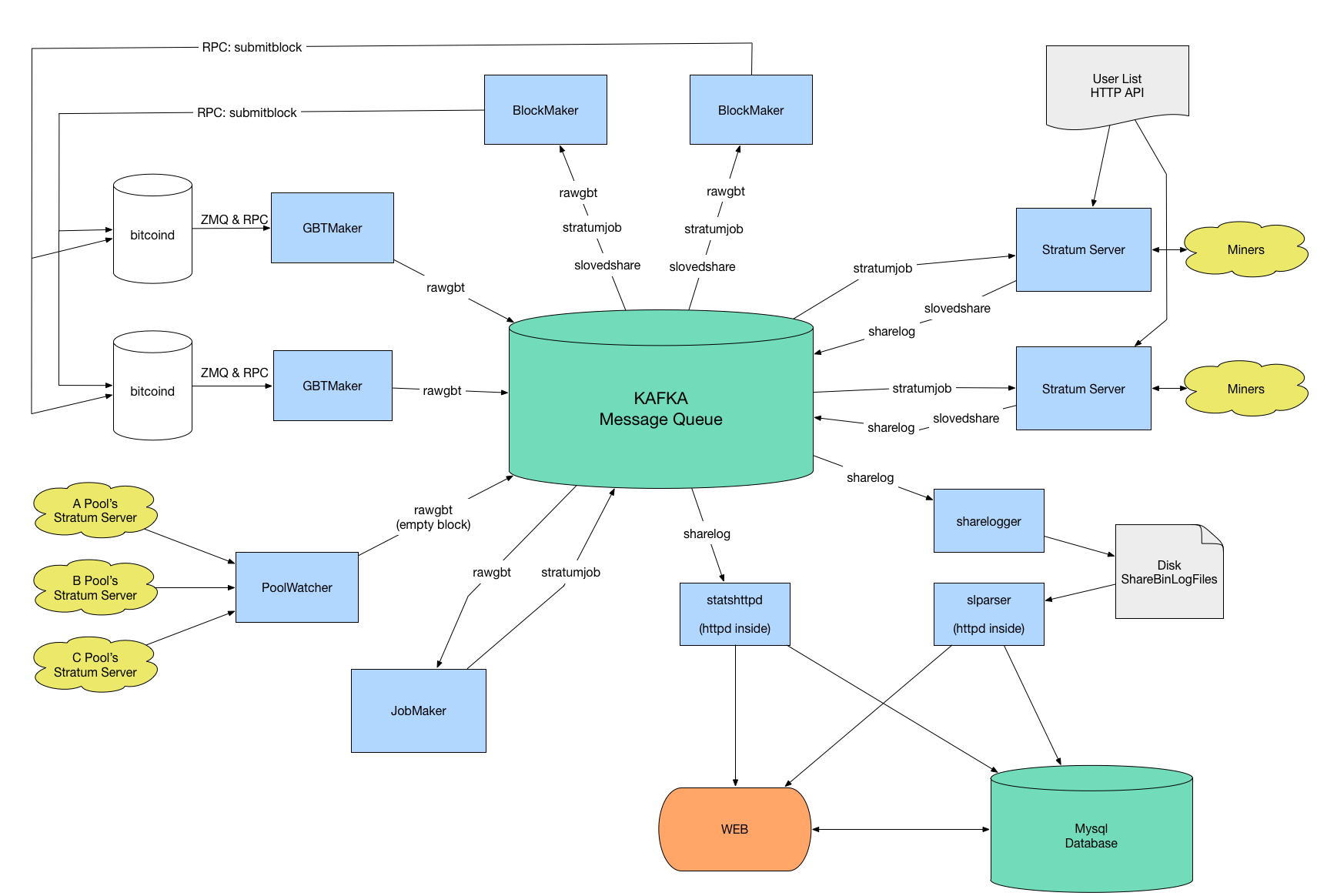
矿池交互图

编译源代码

git clone https://github.com/btccom/btcpool.git

安装依赖

sudo apt-get update
sudo apt-get install -y git build-essential autotools-dev libtool autoconf automake pkg-config cmake \
                   openssl libssl-dev libcurl4-openssl-dev libconfig++-dev \
                   libboost-all-dev libgmp-dev libmysqlclient-dev libzookeeper-mt-dev \
                   libzmq3-dev libgoogle-glog-dev libhiredis-dev zlib1g zlib1g-dev \
                   libsodium-dev libprotobuf-dev protobuf-compiler

注意:不再建议libevent-dev从软件源安装。 libevent的发行版和稳定版本将在sserver中导致死锁错误(问题#75)。建议您使用下面的命令从它的master分支手动构建libevent

有时一个或两个软件包由于依赖关系问题而失败,您可以尝试aptitude

sudo apt-get update
sudo apt-get install -y aptitude
sudo aptitude install git build-essential autotools-dev libtool autoconf automake pkg-config cmake \
                   openssl libssl-dev libcurl4-openssl-dev libconfig++-dev \
                   libboost-all-dev libgmp-dev libmysqlclient-dev libzookeeper-mt-dev \
                   libzmq3-dev libgoogle-glog-dev libhiredis-dev zlib1g zlib1g-dev \
                   libsodium-dev libprotobuf-dev protobuf-compiler
# Input `n` if the solution is `NOT INSTALL` some package.
# Eventually aptitude will give a solution that downgrade some packages to allow all packages to be installed.

安装ZooKeeper

安装依赖

sudo apt-get install -y zookeeper zookeeper-bin zookeeperd

创建所需目录

mkdir -p /data/work/zookeeper
mkdir /data/work/zookeeper/version-2
touch /data/work/zookeeper/myid
sudo chown -R zookeeper:zookeeper /data/work/zookeeper

设置机器id

sudo echo 1 > /data/work/zookeeper/myid

修改配置

sudo vim /etc/zookeeper/conf/zoo.cfg

initLimit=5
syncLimit=2
clientPort=2181
clientPortAddress=127.0.0.1
dataDir=/data/work/zookeeper
#伪分布式
server.1=127.0.0.1:2888:3888

启动服务

#start/stop service
sudo service zookeeper restart
#service zookeeper start/stop/restart/status

安装Kafka

安装依赖

sudo apt-get install -y default-jre

安装java 1.8

sudo apt-get update
sudo apt-get install openjdk-8-jdk
update-alternatives --display java
sudo update-alternatives --config java
java -version

安装kafka

mkdir -p /data/work/kafka
cd /data/work/kafka
wget https://archive.apache.org/dist/kafka/0.11.0.2/kafka_2.11-0.11.0.2.tgz
tar -zxf ./kafka_2.11-0.11.0.2.tgz --strip 1

编辑配置

vim /data/work/kafka/config/server.properties

broker.id=1
offsets.topic.replication.factor=1
message.max.bytes=20000000
replica.fetch.max.bytes=30000000
log.dirs=/data/work/kafka-logs
listeners=PLAINTEXT://127.0.0.1:9092
#伪分布式
zookeeper.connect=127.0.0.1:2181
#start server
cd /data/work/kafka
nohup /data/work/kafka/bin/kafka-server-start.sh /data/work/kafka/config/server.properties > /dev/null 2>&1 &

遇到问题

yw_manager@web204_234:/data/work/kafka$ /data/work/kafka/bin/kafka-server-start.sh /data/work/kafka/config/server.properties
[0.000s][warning][gc] -Xloggc is deprecated. Will use -Xlog:gc:/data/work/kafka/bin/../logs/kafkaServer-gc.log instead.
Unrecognized VM option 'PrintGCDateStamps'
Error: Could not create the Java Virtual Machine.
Error: A fatal exception has occurred. Program will exit.
解决方案

降级java 1.8

从其master分支构建libevent

注意:版本2.1.9-beta之前的libevent将在sserver中导致死锁错误(问题#75)。请使用release-2.1.9-beta和更高版本。

wget https://github.com/libevent/libevent/releases/download/release-2.1.10-stable/libevent-2.1.10-stable.tar.gz
tar zxf libevent-2.1.10-stable.tar.gz
cd libevent-2.1.10-stable
./autogen.sh
./configure --disable-shared
make -j$(nproc) && sudo make install
编译librdkafka-v0.9.1
wget https://github.com/edenhill/librdkafka/archive/0.9.1.tar.gz
tar zxvf 0.9.1.tar.gz
cd librdkafka-0.9.1
./configure && make -j$(nproc) && sudo make install

# if you want to keep static libraries only
sudo rm -v /usr/local/lib/librdkafka*.so /usr/local/lib/librdkafka*.so.*

下载Bitcoin源码,并建立链接到BTCPool

支持ETH的矿池用BTC选项

mkdir work
sudo mv work/ /data/
cd /data/work

wget -O bitcoin-0.16.0.tar.gz https://github.com/bitcoin/bitcoin/archive/v0.16.0.tar.gz
tar zxf bitcoin-0.16.0.tar.gz

git clone https://github.com/btccom/btcpool.git
cd btcpool
mkdir build
cd build

# Release build:
cmake -DJOBS=4 -DCHAIN_TYPE=BTC -DCHAIN_SRC_ROOT=/data/work/bitcoin-0.16.0 ..
make -j$(nproc)

# Debug build:
cmake -DCMAKE_BUILD_TYPE=Debug -DCHAIN_TYPE=BTC -DCHAIN_SRC_ROOT=/data/work/bitcoin-0.16.0 ..
make -j$(nproc)
常见问题

使用当前最新版本bitcoin v0.21.0提示如下错误,暂时未跟进该问题,先用v0.16.0版本测试

CMake Error at CMakeLists.txt:267 (message):
  /data/work/bitcoin-0.21.0/src/crypto/libbitcoin_crypto.a not exists!

估计是本地已安装boost版本问题,本项目依赖boost v1.65,删除本地已安装boost,重新运行第一步,安装依赖

/usr/local/include/boost/thread/pthread/condition_variable.hpp:131: undefined reference to `boost::this_thread::interruption_point()'
collect2: error: ld returned 1 exit status
CMakeFiles/jobmaker.dir/build.make:114: recipe for target 'jobmaker' failed
make[2]: *** [jobmaker] Error 1
CMakeFiles/Makefile2:125: recipe for target 'CMakeFiles/jobmaker.dir/all' failed
make[1]: *** [CMakeFiles/jobmaker.dir/all] Error 2
Makefile:140: recipe for target 'all' failed
make: *** [all] Error 2

运行测试

./unittest
I0125 16:19:24.673416  7530 TestMain.cc:73] BTC unittest version 2020.06.09-11-fix-jobmaker-kafka-17-g0127a750
[==========] Running 91 tests from 24 test cases.
[----------] Global test environment set-up.
[----------] 1 test from BitcoinUtils
[ RUN      ] BitcoinUtils.GetBlockRewardBitcoin
[       OK ] BitcoinUtils.GetBlockRewardBitcoin (1 ms)
[----------] 1 test from BitcoinUtils (1 ms total)
...
[----------] Global test environment tear-down
[==========] 91 tests from 24 test cases ran. (4711 ms total)
[  PASSED  ] 91 tests.

初始化btcpool

初始化目录

cd /data/work/btcpool/build
bash ../install/init_folders.sh

设置全节点

docker for Parity

https://github.com/btccom/btcpool/tree/master/docker/eth-parity/latest

docker for Geth

https://github.com/btccom/btcpool/tree/master/docker/eth-geth/v1.8.23-btcpool-patched

安装mysql

sudo apt-get update
sudo apt-get install mysql-server
systemctl status mysql.service

初始化mysql数据库以及表

cd /data/work/btcpool/install
sudo mysql -uroot -p

CREATE DATABASE bpool_local_db;
USE bpool_local_db;

SOURCE bpool_local_db_ETH.sql;

CREATE DATABASE bpool_local_stats_db;
USE bpool_local_stats_db;
SOURCE bpool_local_stats_db.sql;

参考文档

https://github.com/btccom/btcpool-ABANDONED/blob/master/docs/INSTALL-ZooKeeper.md
https://github.com/btccom/btcpool-ABANDONED/blob/master/docs/INSTALL-Kafka.md
https://github.com/btccom/btcpool/blob/master/docs/INSTALL-BTCPool.md
https://www.pianshen.com/article/5122807736/
https://en.bitcoin.it/wiki/Merged_mining_specification
https://github.com/btccom/btcpool-go-modules/tree/master/mergedMiningProxy
https://blog.csdn.net/a1291985595/article/details/108799549

dfuse - database dirty flag set (likely due to unclean shutdown)

问题

由于同步节点由dfuseeos本身管理和运行,因此从测试的角度来看,dfuseeos的稳定性会对同步节点产生影响。如何避免这种关联导致的异常退出?

./dfuseeos start
Starting dfuse for EOSIO with config file './dfuse.yaml' 
Launching applications: abicodec,apiproxy,blockmeta,booter,dashboard,dgraphql,eosq,eosws,merger,mindreader,relayer,search-archive,search-forkresolver,search-indexer,search-live,search-router,statedb,tokenmeta,trxdb-loader 
Your instance should be ready in a few seconds, here some relevant links:

  Dashboard:        http://localhost:8081

  Explorer & APIs:  http://localhost:8080
  GraphiQL:         http://localhost:8080/graphiql

instance stopped, attempting restore from source (operator/operator.go:154) {"source": "snapshot", "command": "nodeos --config-dir=./mindreader --data-dir=/home/surou/Documents/Test_Dfuse/eosio/eos/programs/dfuseeos/dfuse-data/mindreader/data --pause-on-startup"}
<4>warn  2021-01-21T02:43:51.432 nodeos    chain_plugin.cpp:1199         plugin_initialize    ] 13 St13runtime_error: "state" database dirty flag set (log_plugin/to_zap_log_plugin.go:107) 
command terminated with non-zero status (superviser/superviser.go:179) {"status": {"Cmd":"nodeos","PID":4049750,"Exit":2,"Error":{"Stderr":null},"StartTs":1611197031417829539,"StopTs":1611197031434658318,"Runtime":0.016828781,"Stdout":null,"Stderr":null}}
<3>error 2021-01-21T02:43:51.433 nodeos    main.cpp:153                  main                 ] database dirty flag set (likely due to unclean shutdown): replay required (log_plugin/to_zap_log_plugin.go:107) 
cannot find latest snapshot, will replay from blocks.log (superviser/snapshot.go:153) 
restarting node from snapshot, the restart will perform the actual snapshot restoration (operator/operator.go:393) 
Received termination signal, quitting 
Waiting for all apps termination... 
app trxdb-loader triggered clean shutdown 

解决方案

第一条建议是mindreader独立于其余堆栈运行。这将大大减少dfuse-eosio的异常退出(由于其他部分)而影响mindreader操作的可能性,这对于node-manager管理nodeos进程的应用程序也是如此。

下一步是通过拍摄快照和自动恢复来定义良好的恢复策略。即使没有为EOSIO设置dfuse,nodeos也存在不干净关机的风险,例如由于内存不足错误,服务器意外重启以及其他原因。

如果您还没有自动快照获取机制,则本部分中的建议是node-manager在侧面独立运行应用程序。它将包含链的数据和状态的另一个同步副本,也可以用于服务Nodeos RPC API。这个程序负责定期拍摄自动快照。

# Storage bucket with path prefix where state snapshots should be done. Ex: gs://example/snapshots
node-manager-snapshot-store-url: <storage location, local path or supported cloud provider bucket>
# Enables restore from the latest snapshot when `nodeos` is unable to start.
node-manager-auto-restore-source: snaphost
#  If non-zero, a snapshot will be taken every {auto-snapshot-modulo} block.
node-manager-auto-snapshot-modulo: 100000 # Decrease for network with heavier traffic to take snapshot more often and shrink time to catch up from latest snapshot to HEAD
# If non-zero, after a successful snapshot, older snapshots will be deleted to only keep that number of recent snapshots
node-manager-number-of-snapshots-to-keep: 5 # Uses 0 to keep them all, useful for eventually regenerating dfuse merged blocks in parallel (not very likely but possible) 

当这些快照存在时,您现在可以将mindreader应用程序配置为使用它们,以在无法启动该nodeos过程(也几乎可以通过快照还原解决)时自动使用它们进行还原,mindreader会在过去启动并赶上来。所需的添加设置为:

# Storage bucket where `node-manager` wrote its snapshot, must be shared with `mindreader` app.
mindreader-snapshot-store-url: <storage location, local path or supported cloud provider bucket>
# Enables restore from the latest snapshot when `nodeos` is unable to start.
mindreader-auto-restore-source: snaphost

一切都可以在同一台计算机上运行,​​并可以启动不同的进程。例如,它也可以被容器化以在Kubernetes中运行。

另一个选择是使用该mindreader-stdin应用程序。此应用程序与mindreader应用程序类似,但不管理nodeos流程。相反,它nodeos通过stdin管道消耗深层数据,调用看起来像nodes -c | dfuseeos start mindreader-stdin <flag or -c config.yaml file>(可能不是确切的调用,如果需要,可以将您链接到文档)。

转载自:https://github.com/dfuse-io/dfuse-eosio/issues/202